
Introduction
Configuring the front end capabilites and views are set up on a User Group basis. That is each User Group may have different features. One simple example is setting up Limits as described in article Setting User Limits (opens in new window/tab).
In this example it is assumed that a new user group called uploaderUG has already been created.
Here we will configure the user group settings for the uploaderUG.
So in the backend click on . Next click on
  , then on
  and then on
  . For this example click on
  . This opens up the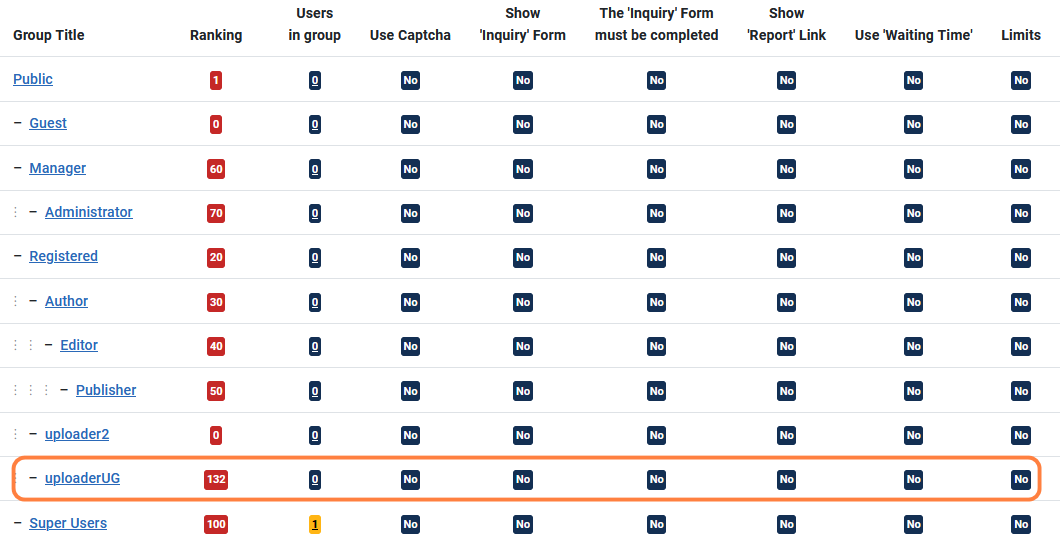
Here we will configure the user group settings for the uploaderUG.
So in the backend click on
. Next click on , then on and then on . For this example click on . This opens up the The text enclosed in the Green Rectangle is reproduced below. It clarifies the need for Ranking values.
Essentially because of the structure of the Joomla User Groups, users will often belong to more than one group.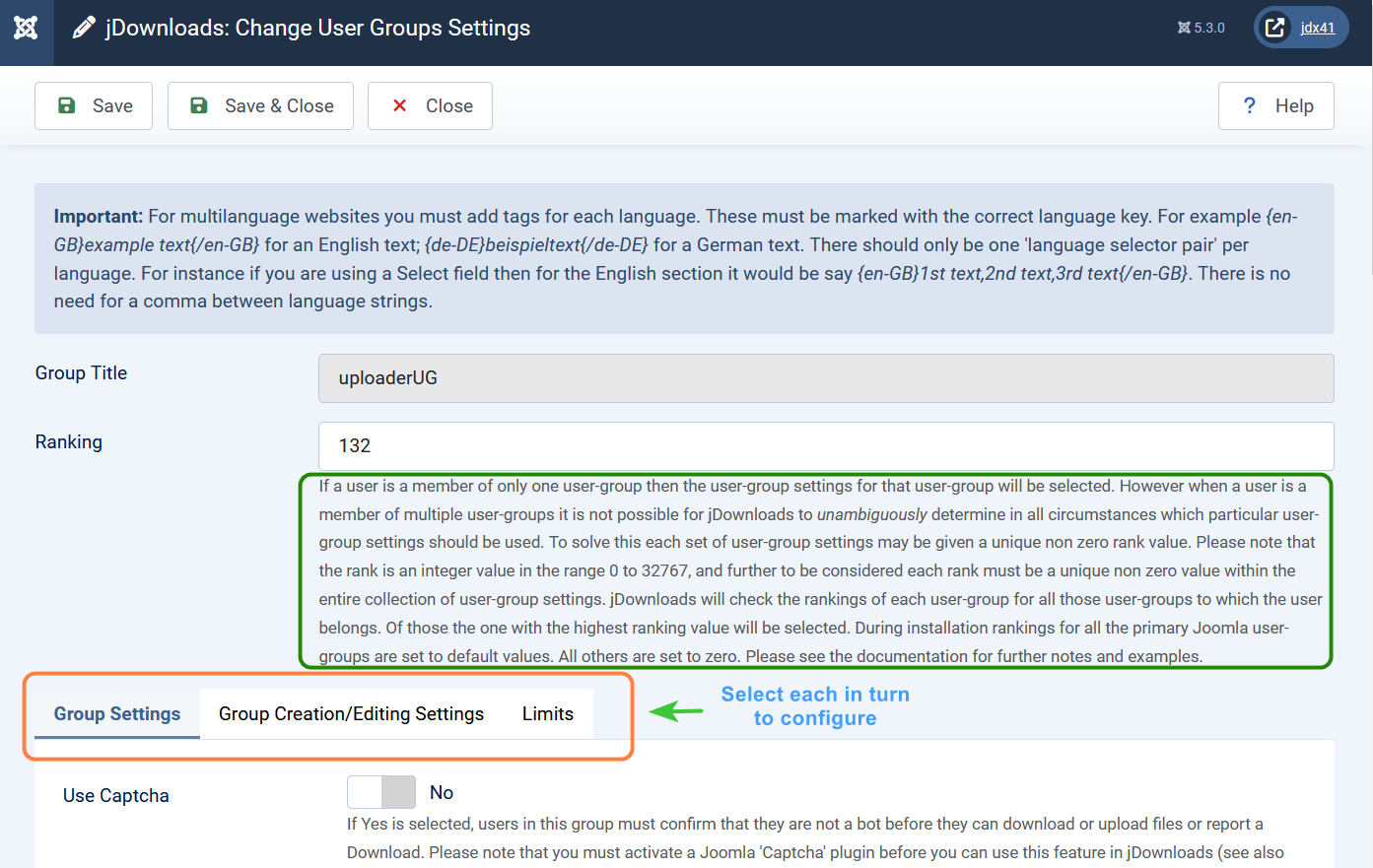
If a user is a member of only one user-group then the user-group settings for that user-group will be selected. However when a user is a member of multiple user-groups it is not possible for jDownloads to unambiguously determine in all circumstances which particular user-group settings should be used.
To solve this each set of user-group settings is given a unique non zero rank value. Please note that the rank is an integer value in the range 0 to 32767, and further to be considered each rank must be a unique non zero value within the entire collection of user-group settings. jDownloads will check the rankings of each user-group for all those user-groups to which the user belongs. Of those the one with the highest ranking value will be selected. During installation rankings for all the primary Joomla user-groups are set to default values. All others are set to zero. Please see the documentation for further notes and examples.
The Front End selections are in the Group Settings and the Group Creation/Editing Settings.
The tab is used when setting limits such as how many downloads may a user make in a week and similar.
There is a specific article Setting User Limits (opens in a new window/tab) which gives the relevant details.

Essentially because of the structure of the Joomla User Groups, users will often belong to more than one group.
If a user is a member of only one user-group then the user-group settings for that user-group will be selected. However when a user is a member of multiple user-groups it is not possible for jDownloads to unambiguously determine in all circumstances which particular user-group settings should be used.
To solve this each set of user-group settings is given a unique non zero rank value. Please note that the rank is an integer value in the range 0 to 32767, and further to be considered each rank must be a unique non zero value within the entire collection of user-group settings. jDownloads will check the rankings of each user-group for all those user-groups to which the user belongs. Of those the one with the highest ranking value will be selected. During installation rankings for all the primary Joomla user-groups are set to default values. All others are set to zero. Please see the documentation for further notes and examples.
The Front End selections are in the Group Settings and the Group Creation/Editing Settings.
The
tab is used when setting limits such as how many downloads may a user make in a week and similar.There is a specific article Setting User Limits (opens in a new window/tab) which gives the relevant details.
Group Settings
If Yes is selected, users in this group must confirm that they are a human and not a bot (robot) before they can download or upload files or report a Download.
Please note that you must activate a Joomla 'Captcha' plugin before you can use this feature in jDownloads.
See also jDownloads documentation Using CAPTCHA (opens in a new Window/Tab)
See also jDownloads documentation Using CAPTCHA (opens in a new Window/Tab)
If Yes is selected then members of this group are enabled to 'report' a Download. Note also the 'View Captcha' setting. See also the jDownloads Configuration tab 'E-Mail' for more settings.
Also if Yes, members of this user group will be shown a form to request personal data before downloading or creating a new download. The requested data will be sent to the e-mail addresses stored in the settings for this purpose.
Allows you to set a time delay in seconds before the downloading of a file begins. Type in here the number of seconds the user must wait. The user will see the 'Waiting Time Message' with its countdown timer in the summary page. The file becomes downloadable when the counter reaches zero. Setting the delay to zero disables the wait timer so there is no delay.
Requires 'Summary' view so set Configuration - 'Downloads' Tab - Activate 'direct-downloading' to No.
The text enclosed in the Green Rectangle is reproduced below. It clarifies the need for Ranking values.
Essentially because of the structure of the Joomla User Groups, users will often belong to more than one group.
There are three sections of extra settings in jDownloads. These are Group Settings, GroupCreation/Editing Settings and Limits.
Essentially because of the structure of the Joomla User Groups, users will often belong to more than one group.
There are three sections of extra settings in jDownloads. These are Group Settings, GroupCreation/Editing Settings and Limits.
The Text below the Ranking clarifies the need for Ranking Values :
If a user is a member of only one user-group then the user-group settings for that user-group will be selected. However when a user is a member of multiple user-groups it is not possible for jDownloads to unambiguously determine in all circumstances which particular user-group settings should be used. To solve this each set of user-group settings may be given a unique non zero rank value. Please note that the rank is an integer value in the range 0 to 32767, and further to be considered each rank must be a unique non zero value within the entire collection of user-group settings. jDownloads will check the rankings of each user-group for all those user-groups to which the user belongs. Of those the one with the highest ranking value will be selected. During installation rankings for all the primary Joomla user-groups are set to default values. All others are set to zero. Please see the documentation for further notes and examples.
If a user is a member of only one user-group then the user-group settings for that user-group will be selected. However when a user is a member of multiple user-groups it is not possible for jDownloads to unambiguously determine in all circumstances which particular user-group settings should be used. To solve this each set of user-group settings may be given a unique non zero rank value. Please note that the rank is an integer value in the range 0 to 32767, and further to be considered each rank must be a unique non zero value within the entire collection of user-group settings. jDownloads will check the rankings of each user-group for all those user-groups to which the user belongs. Of those the one with the highest ranking value will be selected. During installation rankings for all the primary Joomla user-groups are set to default values. All others are set to zero. Please see the documentation for further notes and examples.
There is a specific article Setting User Limits (opens in a new window/tab) which gives the relevant details.
Group Settings
If Yes is selected, users in this group must confirm that they are a human and not a bot (robot) before they can download or upload files or report a Download. Please note that you must activate a Joomla 'Captcha' plugin before you can use this feature in jDownloads.
Using CAPTCHA (opens in a new Window/Tab)
Using CAPTCHA (opens in a new Window/Tab)
Please note that you must activate a Joomla 'Captcha' plugin before you can use this feature in jDownloads.
Using CAPTCHA (opens in a new Window/Tab)
Using CAPTCHA (opens in a new Window/Tab)
If Yes is selected then members of this group are enabled to 'report' a Download. Note also the 'View Captcha' setting. See also the jDownloads Configuration tab 'E-Mail' for more settings.
If Yes, members of this user group will be shown a form to request personal data before downloading or creating a new download. The requested data will be sent to the e-mail addresses stored in the settings for this purpose.
Allows you to set a time delay in seconds before the downloading of a file begins. Type in here the number of seconds the user must wait. The user will see the 'Waiting Time Message' with its countdown timer in the summary page. The file becomes downloadable when the counter reaches zero. Setting the delay to zero disables the wait timer so there is no delay.
Requires 'Summary' view so set Configuration - 'Downloads' Tab - Activate 'direct-downloading' to No.
Allows you to set the text for the 'Waiting Time Message'. The string variable %s must exist in the message so that it can be periodically updated with the remaining time.

The message is displayed at the position where the placeholder variable {url_download} occurs in the layout.
If Yes is selected XXX then members from this group are shown their details about downloading and uploading limitations. The details are displayed in the 'summary' layout where the placeholder variable{view_user_limits_info} is included.  <
<
<Alternatively you can also use the jDownloads View Limits module.
This is the structure of the 'Limits Message'. Note that numerous placeholder variables exist in this text. They will be replaced at execution time with appropriate labels and values.
CSS classes, HTML code and arbitrary text may be included as you require.
CSS classes, HTML code and arbitrary text may be included as you require.
The available placeholder variables are
{msg_title}, {files_daily_label}, {files_weekly_label}, {files_monthly_label}, {volume_daily_label}, {volume_weekly_label}, {volume_monthly_label}, {upload_daily_label}, {remaining_label}, {files_daily_value}, {files_weekly_value}, {files_monthly_value}, {volume_daily_value}, {volume_weekly_value}, {volume_monthly_value}, {upload_daily_value}, {files_daily_rest_value}, {files_weekly_rest_value}, {files_monthly_rest_value}, {volume_daily_rest_value}, {volume_weekly_rest_value}, {volume_monthly_rest_value}, {upload_daily_rest_value}.
{msg_title}, {files_daily_label}, {files_weekly_label}, {files_monthly_label}, {volume_daily_label}, {volume_weekly_label}, {volume_monthly_label}, {upload_daily_label}, {remaining_label}, {files_daily_value}, {files_weekly_value}, {files_monthly_value}, {volume_daily_value}, {volume_weekly_value}, {volume_monthly_value}, {upload_daily_value}, {files_daily_rest_value}, {files_weekly_rest_value}, {files_monthly_rest_value}, {volume_daily_rest_value}, {volume_weekly_rest_value}, {volume_monthly_rest_value}, {upload_daily_rest_value}.
Internal notes are only visible in the backend.

Group Creation/Editting Settings
When selected and the user-group has permission to create a Download then an 'Add' icon will be shown in the frontend header area.

When Yes, the 'Category Selection list box' is available and lists those categories where a user has the relevant permission to create a new download or edit an existing download. This enables members of this user group to select the category when creating or to change it during editing. When No the user may create in any permitted category but when editing the user cannot change the existing assigned category.
Note this field will be overridden for menu items type 'Create Download' if the Options tab for that menu item restricts the user to creating in a specified Category.
Note this field will be overridden for menu items type 'Create Download' if the Options tab for that menu item restricts the user to creating in a specified Category.
When the 'tags' field in the section below is enabled then this field, when set, allows creation of new Jommla! tags. If this field is unset then new tags cannot be created and only existing ones may be used. Please see documentation for more details.

When selected new Download sets created in the frontend will be published automatically.

Shows Download fields in a tabbed form or as a sequential List. A sequential list is useful if the user is only being asked for a few details. Default is Yes. Note: Self-created fields or field groups are always displayed within a tab.

When the 'access' field in the 'fields selection' section below is 'unticked' then the Access Level given here will be used. If either the 'access' field below is 'ticked' or this field, the 'Default access view level' field, is left at '-Select Access-' then the Access Level in the Parent Category is used. Note: to untick the 'Access' field you must also untick the 'Single User Access' field.

Allows you to specify the individual file types that may be submitted with the form. Separate each extension type with a comma (,); for example ',doc,docx'.

A preview file is either an audio or a video file. Specify the individual file types that may be submitted as a comma separated list such as 'mp3,mp4,wav'.

Only the following file types are supported:
audio types: mp3, wav, oga
video types: mp4, flv, webm, ogv, ogg (note ogg type may be audio or video so it is assumed to be video).
audio types: mp3, wav, oga
video types: mp4, flv, webm, ogv, ogg (note ogg type may be audio or video so it is assumed to be video).
Allows you to specify the maximum size allowed for submitted files in kilobytes (1024 KB = 1 MB). Pre-set value: 5120.

Allows you to specify how many images members of this group can upload into a Download.

Allows you to add a text message that is shown above the creation/edit form. 
Data field Selection
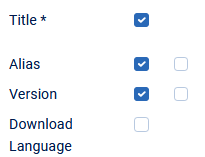
The Data Fields selection comprises what may be described as a set of seven 'tick box' sections. In some fields there are two adjacent 'tick boxes'. As explained in the note below if both 'tick boxes' are selected then the field is mandatory.

First section
The Title is always required so it is 'starred'.
The Alias is, in my view, essential. It is automatically created from the Title.
The Version is not essenial but useful to help control.updates to a Download.
The Download language is normally only required on multilanguage sites
Publishing Tab Section
Specify the Category for the Download - This is required.
Set Access - the View Access Level is actually always necessaryin my view.
Single User Access is rarely required. It is used for personal 'archives' and similar
Tags - Tick if Tags are required.
Published - tick when Download is is ready.
Featured - tick if Download is to have a Featured 'Star'.
Created by - tick if you wish to have the option to name who created the Download.
Created Date - in my view this is always necessary.
Modified Date - similarly this should also be ticked.
Mark Download as Updated - If you do update a download, then this is really necessary.
Publishing Timeframe - rarely needed. But useful for say New Year Greetings and similar.
Ordering - set if you want to allow Dowloads to be order by date or similar.

Description Tab
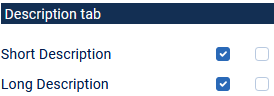
Short Description. This can be very useful for users to decide if they will download.
The long description just allows more space for extra notes and similar
Files Tab
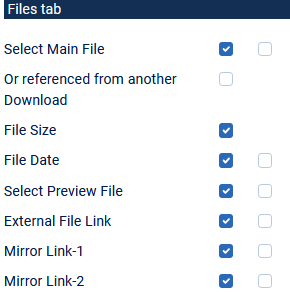
Select Main File allows you to upload a file from you Device such as a Desk Top, a Laptop and similar'
Alernatively you may refer to a file in another Download.
jDownlads will show the size of the downloadable file in kBytes
jDownloads will fill these fields eith current date and time, which you may edit.
A preview file is used when the main file is an audio or video file. A preview file is essential as there is no known method of prenting someone from copying the file whilst it is playing!!
When your site is a long way from the server which holds your files they will take some time to download. A mirror link is a special server that is relatively close to you that monitors the distant devie and upnloads any new or modified file,
Images Tab
This allows adding an image as part of the Download.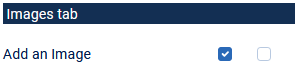
Aditional Tab
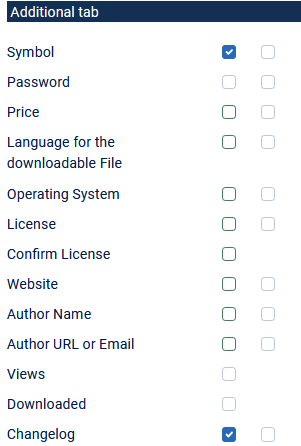
Tick if you want a symbol, such as PDF, which indicates the Download fille type.
You may add a password which the user must know in order to download.
If you add a Price then your site must be able to handle the transaction and report back success or failure to jDownloads.
It is useful to denote the language of the downloadable file if if it is not the same as the site language.
The Operating System is just information.
jDownloads has several Licenses that you may choose to attach to the Download.
You may set jDownloads to askthe user that the accept the license before Dowloading is able to occur.
The website is just information.
The name of the Author is sometimess useful or desirable.
Similarly for rhe emal or URL for contacting the author.
Shows the number ot timesthe Download has been viewed and has been Downloaded.
Access to the Download Change log
Metadata Tab
Metadata are items of information for search engines. They are used to describe HTML elements and communicate the content of a website for search engines. Website metadata includes page titles, descriptions, keywords, and more to help search engines crawl and rank web pages.
However modern Search Engines are less reliant on Metadata and use other methods of ranking.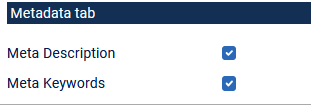
However modern Search Engines are less reliant on Metadata and use other methods of ranking.
ColinM updated: May 2025, July 2026


