
Introduction
This set of options is in four sections:
a. automatically creating category names;
b. using the UTF-8 character set;
c. Changing spaces to underscores and forcing lower case;
d. Use settings in automonitoring.
The most important of these is the use of UTF-8 characters to fully support all languages.
a. automatically creating category names;
b. using the UTF-8 character set;
c. Changing spaces to underscores and forcing lower case;
d. Use settings in automonitoring.
The most important of these is the use of UTF-8 characters to fully support all languages.
UTF-8 must be supported on your servers file system - please check with your web site hosting service if you are unsure
The Database Collation is set to utf8mb4_unicode_ci (strongly recommended) or to utf8mb4_general_ci
The 'Use UTF-8' option below must be selected as Yes
The Database Collation is set to utf8mb4_unicode_ci (strongly recommended) or to utf8mb4_general_ci
The 'Use UTF-8' option below must be selected as Yes
Automatic Category Names
The first item is to see the setting of 'Create the Directory Name automatically'. To find this then on the  click on
  then click on
  . Next click on
  and then, at top right, click on
  . This opens up a set of tabs as shown below. So click on the
  tab. Now scroll down a short way to find the
  entry.

click on then click on . Next click on and then, at top right, click on . This opens up a set of tabs as shown below. So click on the tab. Now scroll down a short way to find the entry.If option 'Create the Directory Name automatically' is set to Yes then a directory is created automatically for each new category using the category name.
If set to No then you can define the directory name for every created category self. But the UTF_8 restrictions apply as described above.
Important: Be careful if you reset this auto creation option again if you have previously been using manually created directory names. In this situation the directory name will be auto changed when you save the category.
UTF-8 character set
jDownloads fully supports UTF-8 characters, and also RTL languages. Whilst almost all web servers now support UTF-8, jDownloads does not assume this is the situation and that is the default setting for files and folder names.
Clearly using UTF-8 character handling is the most desirable option. However to use UTF-8 then three criteria must be fulfilled:
1. UTF-8 must be supported on your servers file system - please check with your web site hosting service if you are unsure;
2. the Database Collation must be set to utf8mb4_unicode_ci (strongly recommended) or to utf8mb4_general_ci;
3. and the 'Use UTF-8' option below must be selected as Yes.
If any of the above criteria are not met then you must ensure that the 'Use UTF-8' option is set to No.
Almost all web servers now support UTF-8. We would recommend you consider changing your web server if it does not support UTF-8.
If you your site is multilinguals then it is suggested you set 'Use UTF-8' to Yes.
Clearly using UTF-8 character handling is the most desirable option. However to use UTF-8 then three criteria must be fulfilled:
1. UTF-8 must be supported on your servers file system - please check with your web site hosting service if you are unsure;
2. the Database Collation must be set to utf8mb4_unicode_ci (strongly recommended) or to utf8mb4_general_ci;
3. and the 'Use UTF-8' option below must be selected as Yes.
If any of the above criteria are not met then you must ensure that the 'Use UTF-8' option is set to No.
Almost all web servers now support UTF-8. We would recommend you consider changing your web server if it does not support UTF-8.
If you your site is multilinguals then it is suggested you set 'Use UTF-8' to Yes.
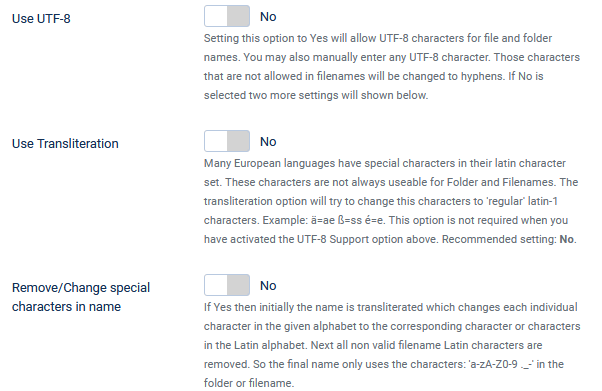
The Default values for the UTF-8 related options is No as illustrated.
With the default settings then you will need to restrict your category and Download names to the alphanumeric 'Latin-1' character set (which only contains the Western European characters).
Setting the option 'Use Transliteration' to Yes does assist as it switches characters such a Greek capital delta character, Δ, to the latin character D.
For more information see Transliterartion (Wikipedia) (opens in a new window/tab).
Another alternative is to use option 'Remove/Change special characters in name' to Yes.
With the default settings then you will need to restrict your category and Download names to the alphanumeric 'Latin-1' character set (which only contains the Western European characters).
Setting the option 'Use Transliteration' to Yes does assist as it switches characters such a Greek capital delta character, Δ, to the latin character D.
For more information see Transliterartion (Wikipedia) (opens in a new window/tab).
Another alternative is to use option 'Remove/Change special characters in name' to Yes.
This will then first transliterate the name which changes each individual character to the corresponding character or characters in the Latin alphabet. Next all non valid filename Latin characters are removed. So the final name only uses the characters: 'a-zA-Z0-9 ._-' in the folder or filename.
Underscores and Lowercase
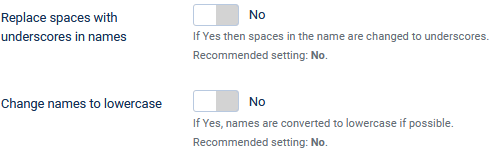
The actions of the two options here, 'Replace spaces wtth underscores in names' and 'Change names to lower case'.
The recommended and default settings for Both is No.
.
The recommended and default settings for Both is No.
.
Auto Monitoring
The option 'Use above Settings also for Auto Monitoring' means, as the name suggests, that the above two options will be used when using the  button.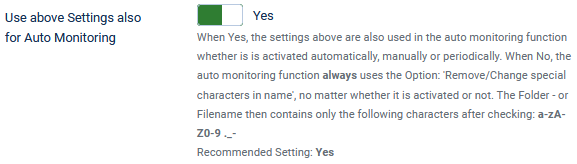
button.That is when set ot the default value Yes, the options 'Replace spaces with underscores in names' and'Change names to lower case' are also used in the auto monitoring function whether is is activated automatically, manually or periodically.
When option 'Use above Settings also for Auto Monitoring' is set to No, then the auto monitoring function always removes or changes special characters in the name.
The resultant Folder or Filename then only contains the characters a-z A-Z 0-9 ._- .
When option 'Use above Settings also for Auto Monitoring' is set to No, then the auto monitoring function always removes or changes special characters in the name.
The resultant Folder or Filename then only contains the characters a-z A-Z 0-9 ._- .
ColinM June 2020, modified June 2023, May 2025 July 2026 -AA



