
Introduction
There are a whole variety of additional items of information and attributes that may be associated with a downloadable file to form a Download. Different websites have different needs dependant upon the purposes and objectives of the site. But it is very rare that a site needs all the possibilities!
"User Groups Settings" are principally used to allocate different limits to different User Groups when Downloading, and to allow different User Groups to create or edit Downloads. For example the Public User Group members might have a time delay imposed before Downloading. One user Group might only be able to create or edit Downloads in a specified Category whilst another User Group might be able to create a Download in any Category.
The purpose of this article is to show how the User Groups Settings may be used to determine which 'attributes' and 'questions' a site needs when a user is Creating and Editing Downloads from the Front End; and what Limits are to be assigned to particular User Groups. Basically it is about customising the form used to input the relevant information. In some instances there is a need for different user groups to setup different information types, and this is supported by having different User Groups.
These facilities are enabled by the jDownloads "User Groups Settings". Each Joomla! User Group has an associated jDownloads "User Groups Settings" database table entry with the same name as the User Group. That is for every User Group created in Joomla!, jDownloads automatically creates an associated collection of "User Groups Settings" with known default values.
"User Groups Settings" are principally used to allocate different limits to different User Groups when Downloading, and to allow different User Groups to create or edit Downloads. For example the Public User Group members might have a time delay imposed before Downloading. One user Group might only be able to create or edit Downloads in a specified Category whilst another User Group might be able to create a Download in any Category.
The purpose of this article is to show how the User Groups Settings may be used to determine which 'attributes' and 'questions' a site needs when a user is Creating and Editing Downloads from the Front End; and what Limits are to be assigned to particular User Groups. Basically it is about customising the form used to input the relevant information. In some instances there is a need for different user groups to setup different information types, and this is supported by having different User Groups.
These facilities are enabled by the jDownloads "User Groups Settings". Each Joomla! User Group has an associated jDownloads "User Groups Settings" database table entry with the same name as the User Group. That is for every User Group created in Joomla!, jDownloads automatically creates an associated collection of "User Groups Settings" with known default values.
A Frontend Uploader
For the purposes of this article it is assumed that a Joomla! User Group, called here the 'uploaderUG', with Registered as it parent user has been created with the appropriate Create, Edit and other relevant permissions to allow the creation or editing of Downloads from the Front End. Another article, Overview of Joomla! Permissions (opens in a new window/tab), deals with those aspects of Permissions settings and how they are applied to categories and downloads for each user group.
Apart from the Public Group all other users, typically the logged in users, automatically belong to more than one user group because of the Joomla! inheritance rules. Note that users automatically belong to the parent user group, the grand parent user group, and so on. That is if you create a User Group called say 'UploaderUG' with Registered as it parent user group then any user who is a member of the UploaderUG is also, by inheritance, a member of the Public user group because the Public user group is th parent of the Registered user group. That is the Public user group is the Grandfather of the UploaderUG.
Apart from the Public Group all other users, typically the logged in users, automatically belong to more than one user group because of the Joomla! inheritance rules. Note that users automatically belong to the parent user group, the grand parent user group, and so on. That is if you create a User Group called say 'UploaderUG' with Registered as it parent user group then any user who is a member of the UploaderUG is also, by inheritance, a member of the Public user group because the Public user group is th parent of the Registered user group. That is the Public user group is the Grandfather of the UploaderUG.
Concept of Ranking
Because a user may belong to several User Groups, either directly or by inheritance, the question arises which "User Group Settings" associated with a user through their membership of multiple User Groups should be used. It cannot be just the 'most powerful' User Group because, for example multiple User Groups could have Registered as their parent. This is a 'many to one' problem for which a unique and predictable result is required. jDownloads solves this by having an assignable 'ranking value' attribute for each of the "User Groups Settings". So of the collection of "User Groups Settings" associated with a user then the one with the highest ranking value takes precedence.
A ranking value is an integer in the range 0 to 32767 with zero as the lowest rank. When a new User Group is created in Joomla! then, as mentioned earlier, jDownloads automatically creates the associated "User Group Settings" with Default values, the default for the ranking is zero. Those "User Groups Settings" with a zero ranking level are ignored by jDownloads. This is important as it allows the controlling user, normally the SuperUser or the Administrator to 'position' the User Group as reqired for their particular site. as the User Group may have been created for purposes that are not related to jDownloads so it avoids the need to keep a check on other User Groups.
Basically if a user belongs to multiple user groups then the attributes and facilities used are those set in the relevant "User Groups Settings" with the highest ranking.
A ranking value is an integer in the range 0 to 32767 with zero as the lowest rank. When a new User Group is created in Joomla! then, as mentioned earlier, jDownloads automatically creates the associated "User Group Settings" with Default values, the default for the ranking is zero. Those "User Groups Settings" with a zero ranking level are ignored by jDownloads. This is important as it allows the controlling user, normally the SuperUser or the Administrator to 'position' the User Group as reqired for their particular site. as the User Group may have been created for purposes that are not related to jDownloads so it avoids the need to keep a check on other User Groups.
Basically if a user belongs to multiple user groups then the attributes and facilities used are those set in the relevant "User Groups Settings" with the highest ranking.
User Groups are individual
By design the attributes and questions selected for a jDownloads User Group Settings do not cascade to other User Groups Settings.
This allows each group to be customised individually. The notice opposite appears at the top of the User-Groups Settings page to remind people.
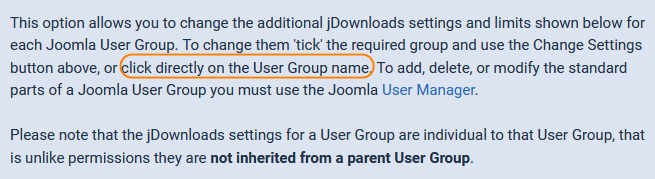
To be clear consider the Public, Registered and UploaderUG user groups. If the Registered user group has a jDownloads ranking value that is greater than that of the UploaderUG then jDownloads will use the settings of the Registered user group. People are accustomed to the Super Users group being 'king'. In jDownloads the Super Users usergroup has a default ranking value of 100. If we set the ranking value of the UploaderUG to say 123 and the User is also a member of the Super Users group then jDownloads will use the UploaderUG "User Groups Settings" for Super Users, not the setting and attributes of the Super Users "User Groups Settings". because it has a lower ranking.
These notes concentrate on the facilities available in the User-Group settings. Further aspects on which user-group settings will be applied by jDownloads are dealt with in an additional article - Which User-Group is Used? (opens in new window/tab) that discusses how jDownloads handles the situation when a user belongs to multiple user-groups.
These notes concentrate on the facilities available in the User-Group settings. Further aspects on which user-group settings will be applied by jDownloads are dealt with in an additional article - Which User-Group is Used? (opens in new window/tab) that discusses how jDownloads handles the situation when a user belongs to multiple user-groups.
Acessing the User Groups Settings
Access is through the main jDownloads panel by clicking on .
.
This will then bring up the Overview Page of the Settings in each User Group as illustrated opposite.
It gives an overview of the major settings applicable to each user group.
To change the setup for a Joomla User Group then first select which user group you wish to modify by clicking on the user group name or by ‘ticking’ in the appropriate checkbox and then clicking on the button at the top of the view.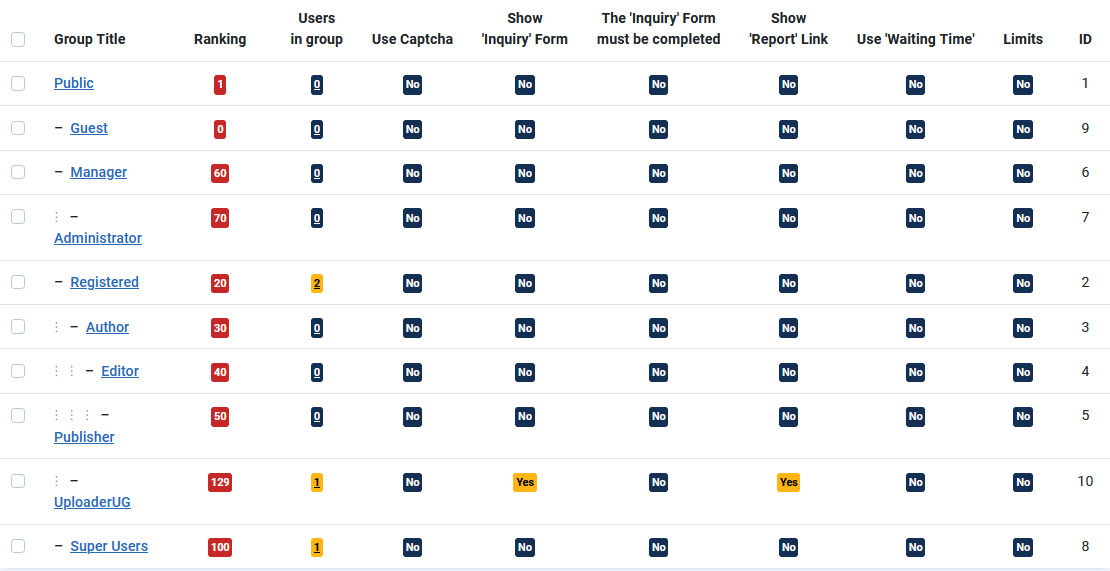
.This will then bring up the Overview Page of the Settings in each User Group as illustrated opposite.
It gives an overview of the major settings applicable to each user group.
To change the setup for a Joomla User Group then first select which user group you wish to modify by clicking on the user group name or by ‘ticking’ in the appropriate checkbox and then clicking on the
button at the top of the view. Notes on the Overview
Ranking Column
In Joomla! users that are logged in will belong to more than one User Group (UG). Membership may not neccessarily have been set explicitly but Joomla! has UG 'inheritance'. For instance a member of the Registered UG will also inherit membership of the Public UG. Someone who is a member of the Publisher UG also inherits membership of the Editor, Author, Registered and Public UGs.
To avoid doubt jDownloads, as described earlier, has a unique Ranking value associated with each UG so that jDownloads may unambiguously determine which set of User Group Settings are to apply. Basically then jDownloads will use the User Group Settings with the highest ranking from all of the UGs of which the user is a member.
Note: jDownloads ignores those UGs with a zero ranking. So in the above 'Example User Groups Overview' image any users in the Guest user group would NOT be actioned!
It is essential that those user groups that will be used in connection with creating or editing Downloads and those to which limits are applied have a non zero value. For instance in the 'Example User Groups Overview' image above, User Group "Test-group" has a zero ranking so it will be ignored by jDownloads. But User Group "UploaderUG" has the highest rank value of 123. So if a user is a member of "UploaderUG" user group then the "Users Group Settings" of that group will take precedence over those of any other user group where the user is a member, either directly or by inheritance.
This even includes a user who is a member of both "UploaderUG" and the "Super Users" group because the Super Users UG has a lower ranking (100) than that of UploaderUG (123). Of course if a user is just a member of the Super Users group, and by inheritance the Public UG, then they will use the Super Users group settings.
When a new User Group is created in Joomla!, such as the one called 'Test-group', then jDownloads automatically creates a database entry with the default User Group settings, including a ranking of zero.
To avoid doubt jDownloads, as described earlier, has a unique Ranking value associated with each UG so that jDownloads may unambiguously determine which set of User Group Settings are to apply. Basically then jDownloads will use the User Group Settings with the highest ranking from all of the UGs of which the user is a member.
Note: jDownloads ignores those UGs with a zero ranking. So in the above 'Example User Groups Overview' image any users in the Guest user group would NOT be actioned!
It is essential that those user groups that will be used in connection with creating or editing Downloads and those to which limits are applied have a non zero value. For instance in the 'Example User Groups Overview' image above, User Group "Test-group" has a zero ranking so it will be ignored by jDownloads. But User Group "UploaderUG" has the highest rank value of 123. So if a user is a member of "UploaderUG" user group then the "Users Group Settings" of that group will take precedence over those of any other user group where the user is a member, either directly or by inheritance.
This even includes a user who is a member of both "UploaderUG" and the "Super Users" group because the Super Users UG has a lower ranking (100) than that of UploaderUG (123). Of course if a user is just a member of the Super Users group, and by inheritance the Public UG, then they will use the Super Users group settings.
When a new User Group is created in Joomla!, such as the one called 'Test-group', then jDownloads automatically creates a database entry with the default User Group settings, including a ranking of zero.
User Group Settings
There are four secions in User Groups Setting
1. Header section
2. Group Settings
3. Group Creation/Editting Settings
4. Limits
1. Header section
2. Group Settings
3. Group Creation/Editting Settings
4. Limits
Rather than detail these here a separate article is more convenient.
They are described in Detailed Notes on User Group Settings (opens in a new window/tab)
They are described in Detailed Notes on User Group Settings (opens in a new window/tab)
Colin M July 2019, updated March 2021, May 2023, December 2024, May 2025, February 2026 -AA



