
Introduction
This short article illustrates creating a new User Group and and its Access Level. This is entirely Joomla based and is not specific to jDownloads. The article illustrates creating a Private User Group and its Access Level. Because it is 'private' only one user group will see it, which is a little bit unusual.
Create User Group
First we create a new user group. In  go to
go to  then in the
  section at far right, click on
  . Next at top left click on
  .
.
This opens up the User Groups creation form as shown opposite. So set the Group Title as appropriate, which in this example is 'PrivateUG', and set the Group Parent as Registered.
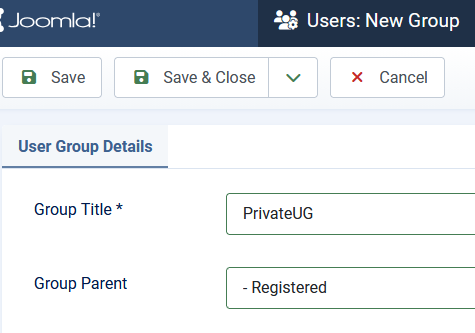
go to then in the section at far right, click on . Next at top left click on . This opens up the User Groups creation form as shown opposite. So set the Group Title as appropriate, which in this example is 'PrivateUG', and set the Group Parent as Registered.
Create Viewing Access Level
The next step is to create the Access Level. So again in the  go to then in the section at bottom right, click on
  . Click on the button at the top left.
Give a name such as 'PrivateView'. Then click on the button.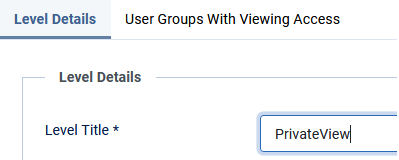
go to then in the section at bottom right, click on . Click on the button at the top left.Give a name such as 'PrivateView'. Then click on the
button.Set Viewing Access
As above in the
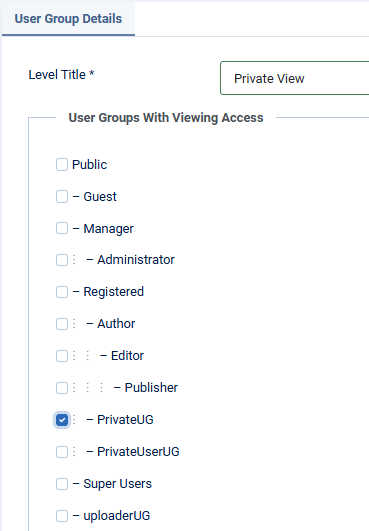
again go to then in section, click on . Next click on  and 'tick' PrivateUG as shown opposite.
Note only one User Group, PrivateUG, will have viewing access. In a general situation more user groups may be selected.
For example a User Group called say UploaderUG would also be seen by Super Users.
Final check
If we now look at
in the section of the Joomla it shows the Level Names, which includes the 'private- view' and which User Groups have viewing access. For the Private-Level it is only members of the PrivateUG that have viewing access. That is, it is only members of the PrivatUG that will see the relevant Downloads.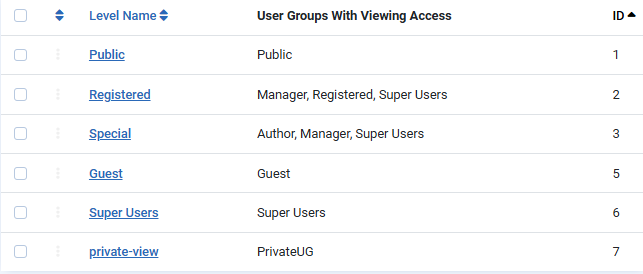
ColinM December 2024, May 2025, February 2026, May 2026, July 2026 -AA



