
Introduction
There are a variety of ways of protecting a directory from unauthorised downloading. The following notes descibe the solutions but it is only the last one that gives full protection. However it also creates a restriction when dealing with media files!
In general if a file is 'not chargeable' in say points or other mechanisms then the combination of the first two methods described below plus the Joomla! Access and Permission features are an excellent defence.
In this article two out of the three available protecton method use what is known as an '.htaccess' file. This file is used by the web site to enable control of many aspects, including access protection. It is not necessary to become familiar with the details of an .htaccess file except to understand that if there is an .htaccess file in a directory then the "commands" apply to the files in that directory and to those files in the entire chain of all the following sub directories. So typically an .htaccess file is placed in a root directory.
Also an .htaccess file may be placed in one of the subdirectories to apply further conditions or to modify conditions set in an earlier .htaccess file. But this is not required.
In general if a file is 'not chargeable' in say points or other mechanisms then the combination of the first two methods described below plus the Joomla! Access and Permission features are an excellent defence.
In this article two out of the three available protecton method use what is known as an '.htaccess' file. This file is used by the web site to enable control of many aspects, including access protection. It is not necessary to become familiar with the details of an .htaccess file except to understand that if there is an .htaccess file in a directory then the "commands" apply to the files in that directory and to those files in the entire chain of all the following sub directories. So typically an .htaccess file is placed in a root directory.
Also an .htaccess file may be placed in one of the subdirectories to apply further conditions or to modify conditions set in an earlier .htaccess file. But this is not required.
Include index.html file
One of the simplest methods of protecting a folder (Category) and its contents (Downloads) is to include a file called either index.html or index.php. With this method if someone makes a direct access to the folder, that is with a direct link of the form http:site/folder/sub-folder/download-name, then the browser will 'execute' the index file instead of allowing access to the Download.
When a new Category is created by jDownloads then an index.html file is automatically inserted in the directory. The contents of this index.html file are typically:
<<html><body bgcolor="#FFFFFF"></body></html> .
If executed this causes a white page on the screen!
When a new Category is created by jDownloads then an index.html file is automatically inserted in the directory. The contents of this index.html file are typically:
<<html><body bgcolor="#FFFFFF"></body></html> .
If executed this causes a white page on the screen!
Disallow "Indexes" using .htaccess file
Another scheme is called the "Indexes Option" which, despite its name, has nothing to do wth the index file; the Indexes Option allows or prevents the contents of a directory being listed as an index of its contents.
Most web site hosts have the Indexes option deactivated as the default so visitors can browse to the download folders and see the files.
Most web site hosts have the Indexes option deactivated as the default so visitors can browse to the download folders and see the files.
The Indexes option sets whether someone can "browse" the directory or not.
If Indexes are allowed, and the directory does not have either an index.html or an index.php file, then a browser will show the contents of the directory just like your file manager would do as shown in the example opposite.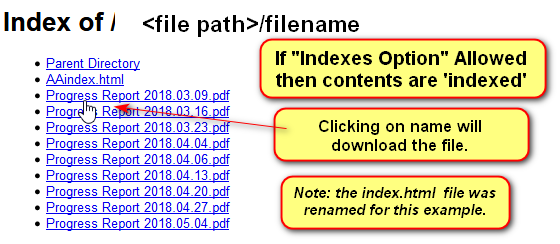
If Indexes are allowed, and the directory does not have either an index.html or an index.php file, then a browser will show the contents of the directory just like your file manager would do as shown in the example opposite.
It simply shows the directory contents as a list with links to the actual file. That is they can be downloaded by the browser.
To disallow Indexes create a file in the jDownloads root folder with the name .htacces and include in it the single line:
Options -Indexes
Note The default Joomla! .htaccess file includes the above option in the root of the site so all directories then have this level of protection.
Go to and in the
  section click on
  . Next in the
  section scroll down to the
  section.
Options -Indexes
Note The default Joomla! .htaccess file includes the above option in the root of the site so all directories then have this level of protection.
Go to
and in the section click on . Next in the section scroll down to the section. Set "Use URL Rewriting" to YES
This involves renaming 'htaccess.txt' to '.htaccess'
(Note the . before htaccess)
Sometimes the native file system does not carry out the renaming as it expects a 'filename' before the 'extension'.
In such a situation renaming is readily done using an FTP utility such as File Zilla.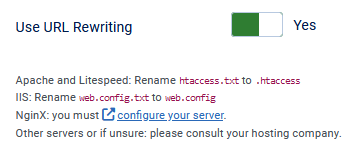
This involves renaming 'htaccess.txt' to '.htaccess'
(Note the . before htaccess)
Sometimes the native file system does not carry out the renaming as it expects a 'filename' before the 'extension'.
In such a situation renaming is readily done using an FTP utility such as File Zilla.
System SEF Plugin
Go to
and in the  section click on
  and search for
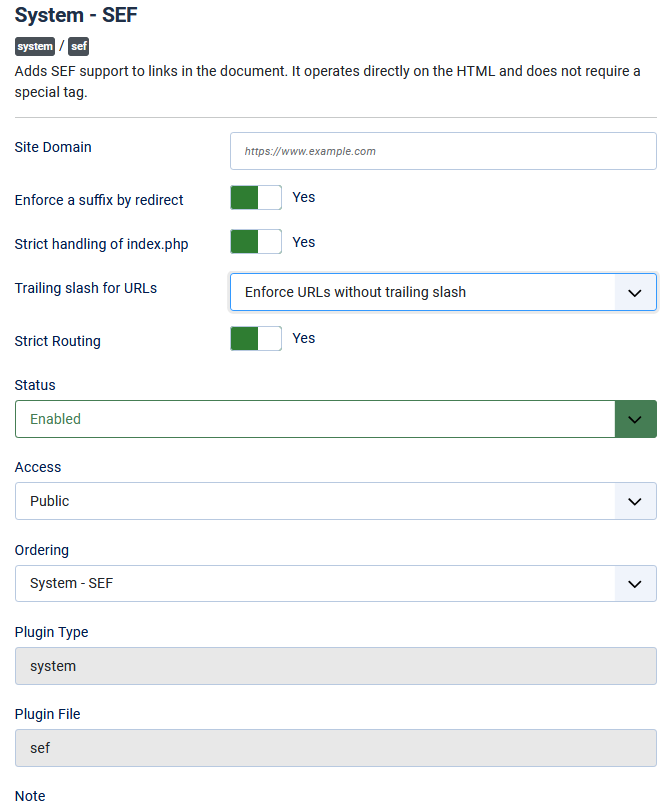
  . This will then show the System-SEF Plugin settings.
Generally the default settings as shown opposite are OK, although setting 'Enforce a suffix by redirect' is often set to Yes.
Deny Access using .htaccess file
The above methods are effective but only if the user does not know the full filepath and file name of the file. If the user knows that information then a browser will still be able to download the file.
For example if the user knows that a file called test.mp4 is stored on www.mysite.com in directory /dirA/subdirB then by loading www.mysite.com/dirA/subdirB/test.mp4 into a browser then that file can be 'stolen'.
The need to protect files from being 'stolen' is obviously very important for those sites which are effectively 'selling' the file, and also where there may be some degree of confidentiality involved. To prevent this jDownloads is able to add a specific .htaccess file into your jDownloads root folder. This file then only allows php files on the site to access and download the file.
For example if the user knows that a file called test.mp4 is stored on www.mysite.com in directory /dirA/subdirB then by loading www.mysite.com/dirA/subdirB/test.mp4 into a browser then that file can be 'stolen'.
The need to protect files from being 'stolen' is obviously very important for those sites which are effectively 'selling' the file, and also where there may be some degree of confidentiality involved. To prevent this jDownloads is able to add a specific .htaccess file into your jDownloads root folder. This file then only allows php files on the site to access and download the file.
This is actioned by using the jDownloads security facility. Click on  -
-  . Next click on
 -then at top right click on
  . Next click on the
  tab and scroll down to find 'Protect your Download Directory'. Set this to Yes as shown in the first image opposite.
This will copy the special .htaccess to your Downloads root directory as shown in the second image opposite. If the 'Protect Your Download Directory' is set to No then the .htaccess file is removed.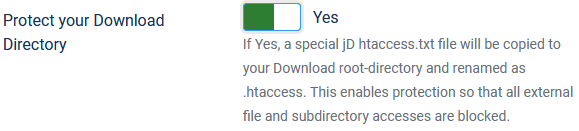

- . Next click on-then at top right click on . Next click on the tab and scroll down to find 'Protect your Download Directory'. Set this to Yes as shown in the first image opposite. This will copy the special .htaccess to your Downloads root directory as shown in the second image opposite. If the 'Protect Your Download Directory' is set to No then the .htaccess file is removed.
To protect your files and allow downloading subject to any criteria such as points, password or similar then set the options noted below.
- in -
 tab set 'Send Downloads using the PHP Script' to Yes;
 - in - tab set 'Protect your Download Directory' to Yes;
- in -tab set 'Activate Hotlinking Protection' to Yes.
Audio and Video Files
jDownloads recognises that in a Download with a media file if you have not provided a 'preview' then it will show the full media file from the normal download area. Importantly, jDownloads does not copy the media file to the preview directory. This is to both save space and also allows actual pre-views to be shown. Please note that browsers allow the file being played to be downloaded so only show previews.
With the above settings to avoid someome 'taking' either an audio or video you must add a preview file when you create or edit the Download. See Adding a Preview (opens in a new window/tab) for more details on adding audio and video previews.
Do not use the full media file as browsers allow the file being played to be downloaded!
Do not use the full media file as browsers allow the file being played to be downloaded!
ColinM, April 2019 modified June 2023, January 2025, May 2025, June 2025, July 2026


