
Introduction
This article is a collection of odds and ends that may help solve strange or apparently non reproducible problems. Some are seemingly simple - when you know the answer!
Several of these 'incidents' were not jDownloads related 'challenges' but due to things outside jDownloads but they may appear to be a jD problem!
As other such problems are found then they will be added to this article.
Several of these 'incidents' were not jDownloads related 'challenges' but due to things outside jDownloads but they may appear to be a jD problem!
As other such problems are found then they will be added to this article.
The section on Regular Labs 'Components Anywhere' has been removed as there is no Joomla 4 version of this component!!!
Check Download Area not working
If the server has the Gzip faciity enabled on your server then instances have occured that the Check Download Area fails to work.
For Reference Gzip compresses code on the server and then the Browser decompresses the file. Typically used for large blocks of code. Requires setting up the browser which is not straighforward. Setting up the server part seems straight forward.
Also check that the zlib.output_compression function in your cPanel is deactivated as this is also known to 'disrupt' the Check Download Area. This is sometimes in a Cpanel function 'Optimize WebSite' or similar. This compresses all content. It has an option of 'Disabled' which should be used.
Example plugin activated
The site seemed OK but the Download button was not working.
Problem turned out that the example plugin had been activated in error. Disabling it solved the problem.
Admin Tools causing 403 Forbidden
jDownloads often has the file to be downloaded on an external or remote site.
If you have used Akeeba Admin Tools to create your .htaccess file then you will find that you get a '403 forbidden error.
It seems that Admin Tools does not allow spaces in Directory Names.
However, because the directory name cannot have spaces in it, this means that jDownloads category names cannot have spaces in them!!
As a result of this 'function' of Admin Tools, any .htaccess file created should not be used on any website with jDownloads.
Even if your site does not presently use 'external files', one day you might start using them. You would then perhaps blame jD exernal files capability!!
If you have used Akeeba Admin Tools to create your .htaccess file then you will find that you get a '403 forbidden error.
It seems that Admin Tools does not allow spaces in Directory Names.
However, because the directory name cannot have spaces in it, this means that jDownloads category names cannot have spaces in them!!
As a result of this 'function' of Admin Tools, any .htaccess file created should not be used on any website with jDownloads.
Even if your site does not presently use 'external files', one day you might start using them. You would then perhaps blame jD exernal files capability!!
Front End seems slow
A site seemed to be very slow when several Categories were added to a regular article using the jD Content Plugin. User had a very high internet bandwith so it should not be slow. Also had a delay when switching between jDownloads regular views such as, for example, between a Downloads listing and a Downloads Detail view.
Most of the Downloads were unchanged. So it seemed a possible solution was that increasing the cache size might help. But this did not solve the problem. And in any case increased cache size does not help first time or occaisional users.
The site had high security and was using IP blocking with Akeeba Tools. Now that meant extensive IP checks were being done on every page load. As it was the Downloads that really needed the protection then the IP blocking was switched to the jDownloads option 'Activate IP Blocking' in the Options tab Security. This IP blocking only operates when attempting to download a file.
This also speeds up the general switching between jDownloads views say from a Downloads Listing to a Downloads Detail or Summary view.
So speed problem solved and security maintained.
Most of the Downloads were unchanged. So it seemed a possible solution was that increasing the cache size might help. But this did not solve the problem. And in any case increased cache size does not help first time or occaisional users.
The site had high security and was using IP blocking with Akeeba Tools. Now that meant extensive IP checks were being done on every page load. As it was the Downloads that really needed the protection then the IP blocking was switched to the jDownloads option 'Activate IP Blocking' in the Options tab Security. This IP blocking only operates when attempting to download a file.
This also speeds up the general switching between jDownloads views say from a Downloads Listing to a Downloads Detail or Summary view.
So speed problem solved and security maintained.
Downloads slow to Start
There are two reasons why Downloads maybe slow to start.
One maybe that the Joomla Error log file is very large. The other is that jDownloads database logs table may be very large.
One maybe that the Joomla Error log file is very large. The other is that jDownloads database logs table may be very large.
Joomla Log Files
If the Downloads take a long time to start then this could be that you have a large Joomla! Error Log file, perhaps several megabytes in size. Looking at the log files (their location is set in Global Configuration - System Settings - Path to Log Folder) will help identify what is causing the problem and making the log files grow in size. Sometimes it is a faulty or 'misconfigured' Plugin.
jDownload logging
jDownloads keeps a record in the database in table abcde_jdownloads_logs, where abcde is your spefic site prefix in the database, of all the files that have been downloaded. A large Downloads log file is often the cause of delays in downloading.
In the jD 4.x series the jD System Plugin has the ability to limit the size of the log file.
It is not limited by the number of entries but by a duration of 93 days. The value of 93 days is the maximum length of a 3 month period.
This duration is because jD can set a monthly limit on the number of downloads by user group members. So jD needs a suficiently long log file to enact the limit properrly in all situations.
In earlier versions the default setting of this parameter, which is "How long, in days, should the rolling period for keeping download logs be?", in the System Plugin was zero which meant no actual limit in size. So if you upgraded from jD3.2 or from early versions of jD3.9 then it would have used the existing setting of zero meaning there is no database limit!
In the jD 4.x series the jD System Plugin has the ability to limit the size of the log file.
It is not limited by the number of entries but by a duration of 93 days. The value of 93 days is the maximum length of a 3 month period.
This duration is because jD can set a monthly limit on the number of downloads by user group members. So jD needs a suficiently long log file to enact the limit properrly in all situations.
In earlier versions the default setting of this parameter, which is "How long, in days, should the rolling period for keeping download logs be?", in the System Plugin was zero which meant no actual limit in size. So if you upgraded from jD3.2 or from early versions of jD3.9 then it would have used the existing setting of zero meaning there is no database limit!
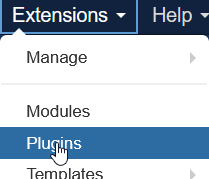
To check the setting in the jD system Plugin goto Extensions and select Plugins as indiated opposite.
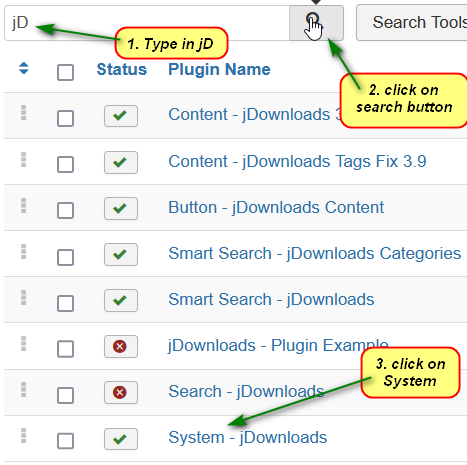
Next type jD into the searchbar.
And then click on the Search Button
Then Click on the System - jDownloads to open it up to see the options.
.
You will see the setting of the 'How long in days, ...' option.
If you are using the jD Usergroup 'Limits' then ensure it is at least 93 days.
Otherwise set as you require but it is stongly suggested that you do NOT set to zero.
Setting zero does NOT turn of the recording of each Download!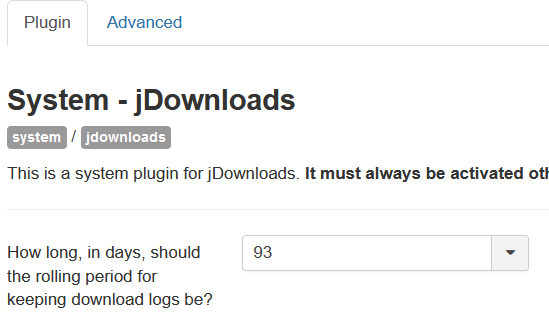
If you are using the jD Usergroup 'Limits' then ensure it is at least 93 days.
Otherwise set as you require but it is stongly suggested that you do NOT set to zero.
Setting zero does NOT turn of the recording of each Download!
Finally click on the  button to save any changes and exit.
button to save any changes and exit.Where does jDownloads select font Colour?
The font colour used by jDownloads in the Frontend views is taken from the active Joomla! template!
jDownload Category List View seemed to only appear once!
A really stange sympton occured when it seemed that a Categories view appeared just once when first created but then did not seem to appear when the page was refreshed. Strange!
The symptom is that a change has been made to a web page, say perhaps an article has had a content pluging item added or a module has been added using a 'modules anywhere' plugin. The view then appears when the edit is completed. But it fails to appear when re-entering the page.
This sort of symptom is consistent with having caching active. It could be the Joomla cache, or perhaps the Browser cache. But clearing those caches may not solve the problem!
Some web modems, particularly those working with a satellite, also have a significant cache. So it may be necessary to reboot your web modem in order to clear its cache.
This sort of symptom is consistent with having caching active. It could be the Joomla cache, or perhaps the Browser cache. But clearing those caches may not solve the problem!
Some web modems, particularly those working with a satellite, also have a significant cache. So it may be necessary to reboot your web modem in order to clear its cache.
Old Items -maybe fixed
Error 500 after updating
An error 500 appeared after updating to jD 4.0. If this occurs it may be related to updating MySQL to version 5.7 from an earlier version. It seems this 'changed' the absolute path settings in jDownloads- Options - Path Settings tab - 'Upload Directory path' and also in Joomla! System - Configuration - Server - 'Path to Temp Folder' and System - Configuration - System - 'Path to Log Folder'. There are many ways to find the absolute path including contacting your web hosting service. This solution was first posted by user LoMa in this Forum Posting (opens in a new window/tab).
Invisible Cats or Downloads
The Categories and Downloads were not visible in the frontend. This looked like it was a view Access level or possibly a Permissions problem. But no, all was well on those fronts.
But even the super user could not see, even when added to every view Access level. The problem was traced to the ECR plugin (this is not Easy Content Reader but Easy Content Restriction).
The plugin, which is embedded in the articles, is very flexible. It works by requiring a password associated with the article or by blocking specific usergroups to see the content. But this is not compatible with the jDownloads.
Disabling the Plugin resolved the problem.
NOTE: Easy Content Restiction has not been updated since 2020 and only available for Joomla 3 - so in reality it is no longer a problem.
But even the super user could not see, even when added to every view Access level. The problem was traced to the ECR plugin (this is not Easy Content Reader but Easy Content Restriction).
The plugin, which is embedded in the articles, is very flexible. It works by requiring a password associated with the article or by blocking specific usergroups to see the content. But this is not compatible with the jDownloads.
Disabling the Plugin resolved the problem.
NOTE: Easy Content Restiction has not been updated since 2020 and only available for Joomla 3 - so in reality it is no longer a problem.
Green Bar on Video Images
Sometimes one sees a 'green bar' on a video such as shown opposite. There may also be colour 'distortions'.
Usually this is with a Firefox browser.
See https://support.mozilla.org/en-US/kb/troubleshoot-extensions-themes-to-fix-problems (opens in a new window/tab)
There maybe various causes/solutions. This was last updated by Mozilla on 9th September 2025.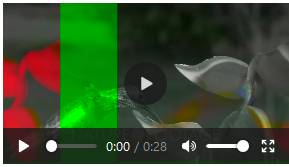
Usually this is with a Firefox browser.
See https://support.mozilla.org/en-US/kb/troubleshoot-extensions-themes-to-fix-problems (opens in a new window/tab)
There maybe various causes/solutions. This was last updated by Mozilla on 9th September 2025.
With some graphics processors and graphics driver setups, Firefox may crash or have trouble showing text or objects on pages when using hardware acceleration.
After turning off hardware acceleration the green band problem was fixed and colours were back to normal.
The DP Calendar Extension
One of the facilities in DP Calendar is the ability to add descriptions. This may include adding the jD Content plugin to allow a user to download more details, which is obviously desirable in many situations.
However sometimes this goes wrong!
Investigation determined that problems only occured when the content plugin was added for a Download in the first line of the Description.
So a line like below where the content plugin, which has been slightly highlighted for clarity, is in the first line of the DP Calandar description:
"Here you may download additional information "
"
will cause 'challenges' with symptons such as other modules 'vanishing' and no further calandar events being shown.
However if the DP Calendar description is in the second or subsequent line as below:
"You will find some additional information
by clicking on the download"
All then works OK
NB the DP Calendar people are aware of this 'challenge' so it may have been fixed.
However sometimes this goes wrong!
Investigation determined that problems only occured when the content plugin was added for a Download in the first line of the Description.
So a line like below where the content plugin, which has been slightly highlighted for clarity, is in the first line of the DP Calandar description:
"Here you may download additional information
"will cause 'challenges' with symptons such as other modules 'vanishing' and no further calandar events being shown.
However if the DP Calendar description is in the second or subsequent line as below:
"You will find some additional information
by clicking on the download
"All then works OK
NB the DP Calendar people are aware of this 'challenge' so it may have been fixed.
ColinM March 2020, updated October 2020, April 2022, Jan 2023., July 2024, May 2025, March 2026 -AA



