
Introduction
The purpose of this article is to present a general explanation of the Joomla! permissions scheme, particularly with reference to jDownloads. A point to remember is that the default situation is that Permississions are not granted, they have to be allowed.
Permissions may be inherited. This means that if a permission is allowed in a top level category for example then that permission will flow into any subcategories of the top level category and also any Download in that whole tree.
This flow of the permissions though the content is essential as it would clearly be an onerous task to have to set the permissions for each jDownload Category and for each Download individually.
When dealing with Joomla! permissions there are two aspects:
Permissions may be inherited. This means that if a permission is allowed in a top level category for example then that permission will flow into any subcategories of the top level category and also any Download in that whole tree.
This flow of the permissions though the content is essential as it would clearly be an onerous task to have to set the permissions for each jDownload Category and for each Download individually.
When dealing with Joomla! permissions there are two aspects:
- the relationship between User Groups and the permission inheritance structure of the user groups;
- the flow of the permissions through the content, that is from the top level categories, into the subcategories and then into the Downloads.
Relationship of User Groups
When dealing with Permissions it is helpful to look at the relationship between the various User Groups (UGs).
The user group structure starts at the Public User Group, not at the Super User group. The Public User group has four siblings (Guest, Manager, Registered and Super Users), two Grandsons (Administrator & Author), one Great-Grandson (Editor) and one Great-Great-Grandson (Publisher). The picture opposite illustrates the relationships for the standard User Groups.
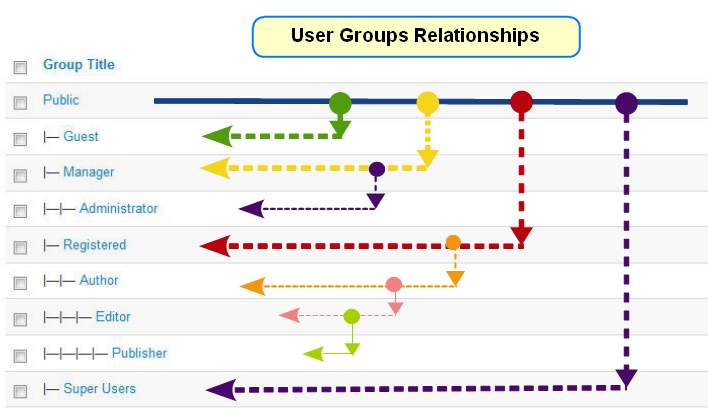
If the Public UG has a particular permission then this is inherited by all User Groups.
Each user group, except Public, has a parent and whether positively set or not then any user will also belong to the Parent user group, and to its parent and so on. That is all users except those only in the Public group will belong to multiplegroups because of this implicit relationship with the parent group, the grand parent and so on. For example if a user is explicitly joined to the to the Editor group then they will also belong to the Author, Registered and Public groups and acquire any permission allowed in those groups
Of course as well as this implicit membership users may be joined explicitly to multiple other groups.
The Super Users UG is actually a 'non standard' UG as it has permissions for all 'actions'. So please remember that logging into the Front End as a Super User is not what a user in another UG would see, that is testing permisions as a Super User in the Front End is NOT a good idea because it is not a realistic test.
When creating a User Group to use for front end creating and editing of Dowloads there is a temptation to use say the existing Publisher User Group. This is also not a good idea as that mean users in that group are able to edit and create articles and other content. A much better scheme is the create say an Uploader usergroup with Registered as its parent. If you do want a particular user to be able to edit articles as well as Downloads then simply put that user in both user groups.
If we create an Uploader user group with Registered as its parent then it will only inherit the permissions that are in the Registered and in the Public user groups. Any specific permission such as being able to edit Downloads would be set in the Uploader user group permissions.
Each user group, except Public, has a parent and whether positively set or not then any user will also belong to the Parent user group, and to its parent and so on. That is all users except those only in the Public group will belong to multiplegroups because of this implicit relationship with the parent group, the grand parent and so on. For example if a user is explicitly joined to the to the Editor group then they will also belong to the Author, Registered and Public groups and acquire any permission allowed in those groups
Of course as well as this implicit membership users may be joined explicitly to multiple other groups.
The Super Users UG is actually a 'non standard' UG as it has permissions for all 'actions'. So please remember that logging into the Front End as a Super User is not what a user in another UG would see, that is testing permisions as a Super User in the Front End is NOT a good idea because it is not a realistic test.
When creating a User Group to use for front end creating and editing of Dowloads there is a temptation to use say the existing Publisher User Group. This is also not a good idea as that mean users in that group are able to edit and create articles and other content. A much better scheme is the create say an Uploader usergroup with Registered as its parent. If you do want a particular user to be able to edit articles as well as Downloads then simply put that user in both user groups.
If we create an Uploader user group with Registered as its parent then it will only inherit the permissions that are in the Registered and in the Public user groups. Any specific permission such as being able to edit Downloads would be set in the Uploader user group permissions.
Permissions and Access Level
Basically a Permission is the ability to do something, such as download the file in a Download. The Access Level is the ability to see the item in the frontend. Obviously in order to apply the action is is essential that the item is visible in the frontend. Obviously if the Download cannot be seen then its file cannot be downloaded.
However being able to view a Download does not mean the associated file is downloadable.
However being able to view a Download does not mean the associated file is downloadable.
For example users in the Public Group would be able to view a file if the the view Access level for that Download includes the Public group.
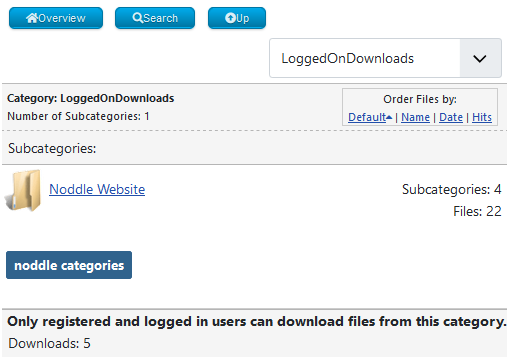
But the user will not be able to download the file if there is no Download permission for the Public group.
jDownloads will show a message such as the one opposite in this situation.
Permission Types
In jDownloads the available frontend permissions types are: Create, Delete, Edit, Edit State, Edit Own and Download. The Download type is specific to jDownloads, the others are standard Joomla! permission types. The action allowed by the Create, Delete and Edit are self evident. Edit State means being able to Publish or Unpublish Downloads. Edit Own is a permission that applies if the user is the Download creator.
Each permission type only has three states: inherit, allow and deny. The default permission is inherit which means use the permission as given in the parent. This is essentialy the permission flow from the permissions root to the Download.
The Allow permission gives members of that User Group the ability to carry out the action, for example Download. As subsequent permissions in the Categories and Downloads will be inherit then the effective or computed permission is Allow.
The Deny permission stops the capability, it also effectively breaks the permission chain and it cannot be undone further down the chain. The Deny permission should never be used except in very special circumstances; generally if you think you need to employ Deny, it probable means you have got your structure wrong!
The resultant permissions for the Downloads are, in principle, different for each User Group. This of course allows members of different User Groups to have different capabilities. For example one user group might just be allowed to Download whilst another user group is able to Create, Edit and Download. Some Downloads might be downloadable by all users but others might be restricted to being downloadable by logged in users only.
However as well as permissions flowing down the content from Categories to Downloads, there is also a flow of permissions from a parent User Group to its siblings as discussed later.
Each permission type only has three states: inherit, allow and deny. The default permission is inherit which means use the permission as given in the parent. This is essentialy the permission flow from the permissions root to the Download.
The Allow permission gives members of that User Group the ability to carry out the action, for example Download. As subsequent permissions in the Categories and Downloads will be inherit then the effective or computed permission is Allow.
The Deny permission stops the capability, it also effectively breaks the permission chain and it cannot be undone further down the chain. The Deny permission should never be used except in very special circumstances; generally if you think you need to employ Deny, it probable means you have got your structure wrong!
The resultant permissions for the Downloads are, in principle, different for each User Group. This of course allows members of different User Groups to have different capabilities. For example one user group might just be allowed to Download whilst another user group is able to Create, Edit and Download. Some Downloads might be downloadable by all users but others might be restricted to being downloadable by logged in users only.
However as well as permissions flowing down the content from Categories to Downloads, there is also a flow of permissions from a parent User Group to its siblings as discussed later.
Do not use Deny
To emphasise the remaks above, we would strongly against setting any permission to Deny.
This cannot be overridden lower down the permission chain. Generally if you need to use Deny then the probability is that you have a poor arrangement of your Categories and Downloads!
This cannot be overridden lower down the permission chain. Generally if you need to use Deny then the probability is that you have a poor arrangement of your Categories and Downloads!
The Permissions Root
There is of course a starting point or root for the Permissions. This is accessed by clicking on the Joomla  then click on
  . Next, at top right, click on
  which shows a panel such as shown opposite, so select
  .
.
The set of permissions now being shown are often referred to as the Component Permissions.
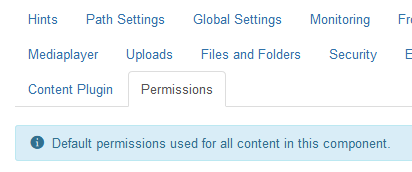
then click on . Next, at top right, click on which shows a panel such as shown opposite, so select .The set of permissions now being shown are often referred to as the Component Permissions.
In a new jDownloads installation then the Download permission in the Public user group is set to  . Thus if your site only has publically available Downloads then all is done.
If you need a different arrangement, say some Downloads as Public and others only available to Logged On users then you need to become familiar with the way permissions are used in the next section, Categories and Downloads.
. Thus if your site only has publically available Downloads then all is done.If you need a different arrangement, say some Downloads as Public and others only available to Logged On users then you need to become familiar with the way permissions are used in the next section, Categories and Downloads.
Categories and Downloads
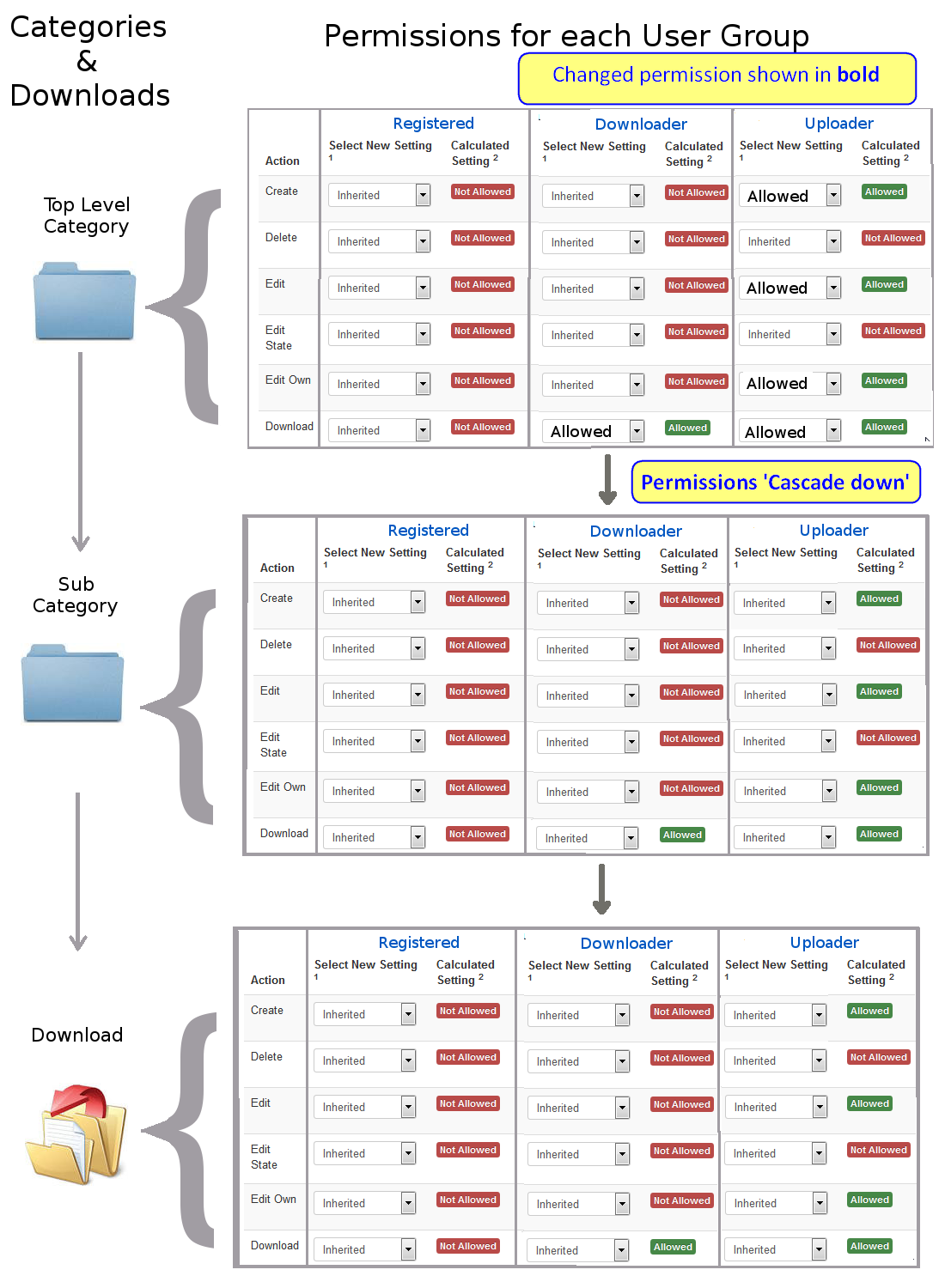
The core Joomla! strategy is that Permissions 'cascade' down the Content from the Component level. So if there is a top level jDownloads category with sub categories and each sub category has multiple Downloads then the permissions in the top category will flow down to all the sub categories and then down to their Downloads as illustrated opposite.
The initial set of permissions for the top level categories are those set in the root or Component Permissions as noted above.
Note that each User Group has its own set of permissions, some will be inherited from other user groups as explained in the section above on 'Relationship of User Groups' and some may be set explicitly.
If you intend to allow some users to Create or edit Downloads from the front end then you should create a specific Uploader user group and join members to that User Group with the Joomla! 'Users' facilities.
It is also useful to create an Access Level called say uploader-view that includes the Uploader user group.
A further step is to set what what jDownloads features you wish to allow the Uploader user group by accessing the button.
The initial set of permissions for the top level categories are those set in the root or Component Permissions as noted above.
Note that each User Group has its own set of permissions, some will be inherited from other user groups as explained in the section above on 'Relationship of User Groups' and some may be set explicitly.
If you intend to allow some users to Create or edit Downloads from the front end then you should create a specific Uploader user group and join members to that User Group with the Joomla! 'Users' facilities.
It is also useful to create an Access Level called say uploader-view that includes the Uploader user group.
A further step is to set what what jDownloads features you wish to allow the Uploader user group by accessing the
button. An important item is to set the Ranking level for the Uploader user group. Typically I set this to say 131 which is higher than the Superuser, which is set by Joomla at 100.
In nearly all situations only the Component permissions and those in the top level categories need changing.
In nearly all situations only the Component permissions and those in the top level categories need changing.
ColinM June 2020, modified June 2023 Updated March 2025, May 2025, February 2026


